 AnoLog
Help
How to use AnoLog.
Make a tracker, log to it, and see how it's going. Everything below happens on your phone, with no account.
Getting started
The app has three tabs along the bottom: Trackers, Reports and Log. It opens on Log, under your thumb.
The first time you open it, AnoLog asks three things:
- Metric or imperial. New trackers use these units.
- Your currency. Pick a chip, or Other for the full list.
- Starter packs: Workouts, Vitals or Money. Tick any, then tap Set up. Or tap Skip to start empty.
A pack makes a group of ready trackers. Workouts gives you weight training, holds, stretches and cardio, with exercises. Vitals gives you blood pressure, heart rate, blood sugar, temperature and body weight. Money gives you a wallet with spending categories.
Make a tracker
A tracker is one thing you log: your weight, your water, a wallet.
From a pack
Skipped the packs at first? An empty Trackers tab lists them. You can also tap Start from a pack instead at the top of the new tracker form. A pack drops out of the list once you have its group.
Your own
- Open the Trackers tab and tap New tracker (bottom right).
- Type a name. Up to three matching presets appear above the field. Tap one to use it, and skip to step 4.
- No preset fits? Pick the kind of number, then its unit.
- Optional: pick a Group, and turn on Always show on Log.
- Tap Create tracker.
There are six kinds:
| Kind | For example | What you see |
|---|---|---|
| Reading | weight, blood pressure, mood | the latest value, plotted over time |
| Tally | practice minutes, water, macros | totals per day, week or month, as bars |
| Balance | a wallet, a budget, a debt | a running balance, income and expenses |
| Pair | weight × reps, distance × time | records, volume and estimated one-rep max |
| Habit | meditate, vitamins | done or not each day |
| Journal | a diary, gratitude, dreams | what you wrote |
- A Pair asks for a First number and a Second number, then how Together they make one: Multiply (kg × reps) or Divide (km ÷ min).
- A Balance asks for a Starting balance. Leave it blank for 0.
- A Habit and a Journal need no unit.
You can't change a tracker's kind later. You can rename it, move it and change how its units display.
Log an entry
- On the Log tab, tap Log (bottom right).
- Pick what you're logging. Your five most recent are at the top. Type to search.
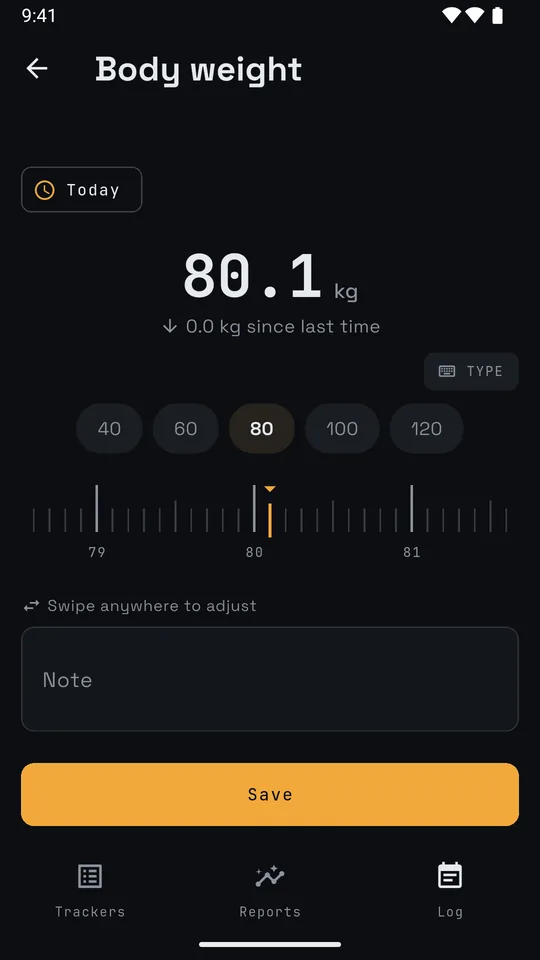
- Set the value. Swipe sideways anywhere on the screen, or tap TYPE for a keypad.
- Optional: change the category, the date or the note.
- Tap Save.
A new entry starts from your last one. Logging the same coffee or the same set again is one tap on Save.
Workouts
A lift, a hold or a run has Log set instead of Save. The form stays open, keeps your numbers for the next set, and lists today's sets above. Tap a set in the list to change it, then Update or Delete.
Faster ways
- Each row on the Log tab has its own add button. It skips the picker.
- A habit's row has a tick box. Tick it, and that's logged.
- Home screen widgets log without opening the app.
Log for another day
Move the Log tab to that day first, then tap Log. A new entry is dated to the day you're looking at.
Fix or delete an entry
Tap the entry on the Log tab. It opens as Edit entry. Change it and tap Update, or tap Delete. A long press deletes too. Either way, Undo shows for 4 seconds.
Charts and reports
Pick a window
The Log and Reports tabs show one window of time. At the top:
- The arrows step one window back or forward.
- The period chip switches between Day, Week, Month and Year. It also has Pick a date and Jump to now.
- Swipe the list left or right to step too.
Both tabs share the window. Step back a month on one, and the other moves with it.
The Log tab
It lists only what you logged in the window, plus trackers set to Always show on Log. Tap a row to open it and see its entries.
Open a tracker's chart
- On the Log tab, open a row and tap Chart › at its foot.
- On the Reports tab, tap a card.
- On the Trackers tab, tap a tracker's ⋮, then Chart.
Each kind gets its own chart:
| Kind | Chart |
|---|---|
| Reading | A dot per reading, with a trend line for things like weight. Drag across to read any point. Pick a range: 1M, 3M, 6M, 1Y or All. |
| Tally | Bars across the window, with the total and the average a day. Tap a bar to read it. |
| Pair | One exercise at a time. Switch between Heaviest, e1RM, Volume and Reps. A ringed dot is a personal record. |
| Balance | Expense and Income as a donut by category. Balance as a running line. |
A journal has no chart. Its bars would only count pages.
The Reports tab
The middle tab shows how things are going, in one scroll:
- Overview first: all your wallets together, spending by category, each wallet's balance, and volume by muscle for your lifts.
- Then a small chart for every tracker. It covers the last 7 days, 8 weeks, 12 months or 5 years, depending on the window. The window you're on is amber.
- Cards and groups start folded. Tap a heading to open one.
- Trackers with nothing in this window fold under one line. Tap it to see their trend.
Categories
Categories split one tracker into parts: the exercises in Weight training, the spending categories in a wallet. The Workouts and Money packs come with them, and a new wallet copies them from your other wallets.
- On the Trackers tab, tap the tracker's ⋮.
- Tap Categories (or Exercises on a workout tracker).
- Tap Add. Pick a section, type a name, tap Add.
- Each category's menu has Rename, Move to…, Archive and Delete.
- Archive hides a category and keeps its entries. Unarchive brings it back.
- Delete asks where its entries go: another category, or Leave uncategorised.
- On a wallet, Also on N other wallets makes the same change on the wallets in the same group.
- N new in the library adds names the pack has that your tracker lacks.
For an exercise, Loaded on a barbell shows its weight as plates. Can be done unloaded adds a bodyweight toggle.
Targets
A target marks progress. It never blocks you.
- On the Trackers tab, tap the tracker's ⋮, then Target.
- For each field, pick At least, At most or, for a reading, Best ever. Type the number.
- For a tally, pick whether it's for each Day, Week or Month.
- Tap Save.
The Log tab then shows it under the row, like "≥ 8 GLASSES A DAY · MET". A chart draws it as a dashed line. Pairs have no target: their records are the target.
Move money between wallets
You need two wallets in the same currency.
- On the Log tab, tap Log.
- Tap Transfer, the last row in the list. Or search "transfer".
- Tap From and To to pick the wallets.
- Type the amount and tap Save.
A transfer moves both balances. It never counts as income or spending.
The calendar
See which days you logged, the way a habit tracker shows them.
- On the Log tab, switch to a week, month or year.
- Tap the calendar button, left of the Settings gear.
Each day gets a dot per tracker you logged, in its group's colour. Tap a day to open it. A year shows a row per tracker, shaded by how many days of each month you logged. Tap a month to open it.
Groups and order
- On the Trackers tab, tap New group.
- Long press a tracker and drag it onto a group to move it. Drop it below the list to take it out of every group.
- A group's + adds a tracker or a subgroup inside it.
- A group's menu has Move up, Move down, Move to…, Edit group and Delete group.
Deleting a group deletes its trackers and their entries. You get a confirm first, then Undo for 4 seconds.
Home screen widgets
- Long press your home screen and tap Widgets.
- Find AnoLog and drag a widget onto the screen.
- Pick the tracker it shows. Things that don't fit are listed below, with the widget that suits them.
- Tap ADD WIDGET.
There are ten:
| Widget | What it does |
|---|---|
| Quick add | One tap adds +1 to a tally, or ticks a habit. |
| Glass | A glass filling toward a daily goal, like water. |
| Today strip | Up to eight trackers and today's value for each. |
| Wallet | A wallet's balance and today's net. |
| Wallet presets | Keys for amounts you spend often, like coffee. |
| Balance | A balance with transfer, income and expense keys. |
| Trend | Latest value and a small chart over 7, 30 or 90 days. |
| Targets | Every tracker with a target, met or not. |
| Next set | Your current lift, with LOG SAME for the next set. |
| Mood | Five faces. Tap one to log today's mood. |
A tap that logs shows UNDO for 4 seconds. To change a widget on Android 12 or later, long press it and tap the pencil.
Back up, restore and export
Your data lives only on your phone. AnoLog opts out of Android's cloud backup, so a backup file is the only copy. Make one now and then.
Back up
- Tap the Settings gear (top right).
- Tap Back up.
- Pick where to save the file: a folder, an SD card, or a drive you're signed in to.
After two weeks with no backup, the gear gets an amber dot and Settings opens on a reminder. Turn it off with Backup reminder.
Restore
- Settings, then Restore from a backup.
- Pick the backup file. AnoLog says what it holds.
- Tap Restore.
Restore replaces everything on the phone with the file. Home screen widgets aren't in a backup, so set them up again after.
Export a spreadsheet
On the Trackers tab, tap a tracker's ⋮, then Export CSV. Your phone's share sheet opens with the file. Units are in the column names.
Settings
Tap the gear at the top of any tab.
| Mode | Follow the phone, Light or Dark. |
| Clock | Phone setting, 12-hour or 24-hour. |
| Week starts on | Monday, Saturday or Sunday. |
| Month starts on | Any day from 1 to 31, for months that run from payday. |
| Units | Metric or imperial, for new trackers. |
| Currency | For new money trackers. Nothing converts. |
| Bar weight | The empty bar for barbell lifts. |
To show one tracker in other units (kg to lb, °C to °F), tap its ⋮, then Units. Only the display changes. Nothing you logged is rewritten.
Questions
Does AnoLog need the internet?
No. It works offline and never sends anything. See the privacy policy.
How do I move to a new phone?
Back up on the old phone, and copy the file to the new one. Install AnoLog there, skip setup, then use Restore from a backup.
I logged on the wrong day.
Tap the entry, change its date, and tap Update.
I deleted something by mistake.
Tap Undo within 4 seconds. After that it's gone, unless you restore a backup.
How do I start over?
Settings, then Clear everything. It deletes every tracker and entry, and can't be undone. Back up first if you might want them.
Something went wrong.
In Settings, tap Report a problem. It opens an email you write and send yourself. Or email rickdtrick.dev@gmail.com.